Thursday, June 27, 2013

Wednesday, October 3, 2012
DevExpress offering Metro-inspired Tile control for Delphi VCL, plans to drop support for Delphi 7
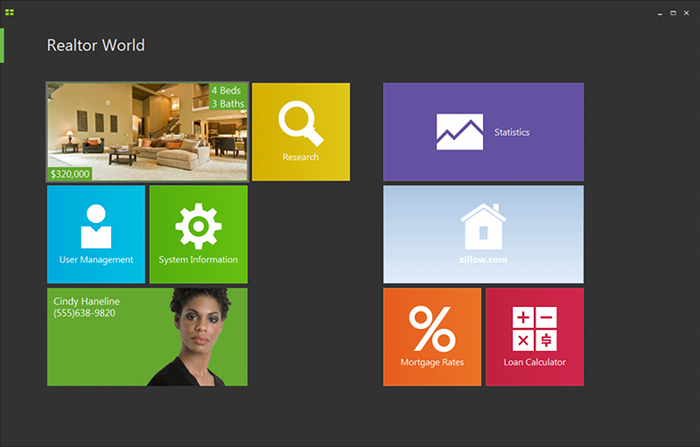
DevExpress has released an update to its VCL component suite,
version 12.1, which includes a Metro-inspired tile control. That is, it
looks like a Windows 8 Metro-style application, but in reality it runs
as a desktop application. The VCL components support Embarcardero’s
Delphi and C++ Builder, but not the FireMonkey library that runs
cross-platform.

The new release also adds a “Server Mode” for the ExpressQuantumGrid grid control, which retrieves only those rows needed to populate the current view.
DevExpress CTO Julian Bucknall has posted about the update. He says it is time to drop support for Delphi 7 (though this is supported in 12.1):
Bucknall has reservations about Embarcadero’s move to Clang and LVVM for 64-bit C++ Builder and eventually for the other languages too:
I doubt Microsoft will mind though. It all helps to promote the Metro style which is the distinctive feature of Windows 8.
More at http://www.itwriting.com/blog/6008-devexpress-offering-metro-inspired-tile-control-for-delphi-vcl-plans-to-drop-support-for-delphi-7.html
The new release also adds a “Server Mode” for the ExpressQuantumGrid grid control, which retrieves only those rows needed to populate the current view.
DevExpress CTO Julian Bucknall has posted about the update. He says it is time to drop support for Delphi 7 (though this is supported in 12.1):
12.1 will be the last version to support Delphi and C++Builder 2010. I will sound a further note of caution: it’s likely that in 2013 we shall drop support for Delphi 7 and Delphi 2007 (what you might call the “ASCII IDEs”), so that we can concentrate on the latest run-times and environments.Delphi 7 is significant because it was the last version to use its own dedicated IDE built with Delphi itself, and by today’s standards is delightfully small and fast.
Bucknall has reservations about Embarcadero’s move to Clang and LVVM for 64-bit C++ Builder and eventually for the other languages too:
I’m going to say we shall treat it with kid gloves. Re-engineering a compiler so fundamentally says “breaking changes” to me, especially given the necessary extensions that are present in the current C++Builder to interface with Delphi. So, fair warning: if the changes are too severe, we shall not support 64-bit C++Builder in 12.2. It took us long enough to support 64-bit Delphi across our entire product line, and this year we don’t have the resources. That doesn’t mean we won’t ever do this (after all, Embarcadero are saying that they’ll switch completely to Clang/LVVM at some point), just that we won’t this year.Returning to the Tile Control: it will be fascinating to see if this sort of approach, mimicking Metro with a desktop app, becomes popular. Microsoft is promising some of the same with Office 15, though we have not seen much of this officially yet. The advantage is that you can make desktop apps just as touch-friendly as Metro apps. The disadvantage is that you do not get Windows Store support, Contracts, app isolation, or other benefits of the Windows Runtime which underlies the Metro side. Users may be confused.
I doubt Microsoft will mind though. It all helps to promote the Metro style which is the distinctive feature of Windows 8.
More at http://www.itwriting.com/blog/6008-devexpress-offering-metro-inspired-tile-control-for-delphi-vcl-plans-to-drop-support-for-delphi-7.html
Monday, October 1, 2012


Monday, July 16, 2012
An Introduction to the TBatchMove Component in Delphi and C++ Builder
An Introduction to the TBatchMove Component in Delphi and C++ Builder
Abstract: TBatchMove can move data between tables with the same database or a different database
Problem:
What is the TBatchMove component and how do I use it with InterBase
(or any other database)?

Solution:
An Introduction to the TBatchMove component
=====================================

1. What is it?

TBatchMove is a VCL component that lets you perform operations on
groups of records in a table. The operations are named with intuitive
names that basically tell what they do.

Listed below are the operations or "modes" that the TBatchMove
component supports.

- batAppend     =>
   appends all records from the source table to the end of the destination
   table.

- batAppendUpdate     =>
   Appends all records from the source table to the end of the destination
   table and updates those records with the same primary index in the
   destination table with the same records from the source table.

- batCopy     =>
  Copies a table and its records to a new table

- batDelete     =>
  Delete all records in the destination table that also appear in the
  source table.

- batUpdate      =>
  Update existing records in the destination table with their counterparts
  in the source table.


2. How do I  use it?
Listed below are steps to setup and run a TBatchMove component to
upsize Paradox data to InterBase.

a.  Put two TTable objects on the form, one for source and one for
destination.
1. Click on "Data Access" tab.

2. Click on table icon.

3. Click on form.

4. Press  to go to the Object Inspector.

5. Define the Database property for table1 to be the BDE alias that
points to the directory where Paradox tables are located.  In this case,
we are using the DBDEMOS alias hat is installed by default when you
do a full install of Delphi 3.

6. Define the TableName property in object inspector for table1 to be the
Paradox table name, In this example, the table name will be the "orders"
sample table that comes with Delphi.  Since we have already specified the
location of the tables, you can easily fill in the TableName property setting
by selecting the table from the picklist of the TableName property.

7. Repeat steps 2.a.1 - 2.a.4 for table2

8. Define the database on table2 to be an alias that points to the InterBase
database, in this case employee.gdb, by selecting the BDE alias that points
to the employee database.

9. Define TableName  property for table2 to be the table name you want
created in InterBase. For simplicity, call it "orders" as well.

10. Configre the TBatchMove component
a.   Put the  TBatchMove component on the form.
1. Click on the Mode property's edit box.

2. Click on the BatchMove icon.

3. Click on the form.

b.  Define the source and destination for TBatchMove
1. Hit  to go to the object inspector.

2. Set the Source property of TBatchMove to be table1.

3. Set the Destination property of TBatchMove to be table2.

d.   Specify the mode for TBatchMove
1.  Click on the Mode property's edit box.
2.  Click on the down arrow that appears to get a picklist of modes to
     choose from.
3.  Click on  "batCopy" to select it from the list.

d. Activate TBatchMove
1. Right click on TBatchMove component
2. Click on  "Execute" on the pop-up menu that appears.

e. What happens when TBatchMove fails?

You can tell TBatchMove to document what happened when you run
a batch move operation by setting the following properties. They tell
Delphi to create a local Paradox table containing records that were
not successfully part of the batchmove operation.

ChangedTablename  => Records that were modified by the batch
                                    move operation

KeyvioltableName  => Records that could not be added because they
                                 violated a uniqueness constraint.

ProblemTableName  => Records that could not be added for one reason
                                   or another.

More at http://edn.embarcadero.com/article/25620
Thursday, March 1, 2012
How to transfer a Delphi Profile from One PC to another
Assuming that Delphi and the other VCLs are is installed in the same folder at the new PC, then the migration is fairly easy if you are comfortable working with regedit.
The information is stored in the Registry under a key called HKEY_CURRENT_USER\Software\Borland\Delphi\5.0 or something like that. You'll find all the registration information under that key, including a list of installed packages.
Just export the keys to a registry file, copy it to the new computer and install it by double-clicking on it
The information is stored in the Registry under a key called HKEY_CURRENT_USER\Software\Borland\Delphi\5.0 or something like that. You'll find all the registration information under that key, including a list of installed packages.
Just export the keys to a registry file, copy it to the new computer and install it by double-clicking on it
Tuesday, September 27, 2011
What is FireMonkey?
What is FireMonkey?
FireMonkey is a native CPU and GPU powered application platform that makes it easy for developers to rapidly build visually engaging and data rich HD and 3D applications with blazing native performance on Windows, Mac and iOS.What's behind the name FireMonkey?
2016 is the year of the FireMonkey in the Chinese calendar. FireMonkey brings with it extra energy and determination to reach far beyond your expectations. The FireMonkey is uniquely inventive and thinks out of the box.We picked the name because our engineers have aimed high. They have done what many thought wasn't possible with our next generation application platform.
And finally because we like the name. We think it's fun.

What programming languages do I use to develop FireMonkey applications?
You can program in either "RAD" C++ or Delphi, two easy to learn component based object oriented languages that are used by millions of developers worldwide. You can choose "RAD" C++ to use existing C++ or C-like language skill or to reuse existing ANSI C++ code in FireMonkey applications. Or you can choose Delphi, an elegant and easy to learn object oriented language.How much does FireMonkey cost?
The FireMonkey platform itself doesn't cost anything. There are no deployment fees or runtime fees. Applications built with the FireMonkey platform can be distributed royalty free. To build FireMonkey applications, you need Delphi XE2, C++Builder XE2 or RAD Studio XE2. You can click here to learn more about these products or download a trial. FireMonkey applicationsWhat is the difference between FireMonkey and RIA platforms like HTML5/CSS, Adobe Flash or Silverlight?
RIA platforms have rich free-form graphics, time based animation, and media capabilities that are well suited for web content, entertainment and advertising. Because RIA applications are typically web embedded, they use scripting and VM engines to execute program code. This provides cross-platform browser compatibility, but comes with a performance trade off. RIA platforms being entertainment focused are not designed around the needs for business applications. Things like enterprise data and services connectivity, business UIs and graphcis, and packaged and enterprise app distribution are not well served with RIA platforms.FireMonkey is a native application platform, with many of the rich capabilities of RIA platforms such as vector graphics, 3D, animation, effect, and cross-platform but FireMonkey is focused on the unique needs of business, ISV, and industrial use software. FireMonkey is fully CPU and GPU native, UI oriented, and provides powerful database and services connectivity.
Is FireMonkey a gaming framework?
Not really. Unlike 3D frameworks such as Unity 3d, Unreal or Torque that specifically work on game development, FireMonkey is focused on the business or industry specific applications such as healthcare, automotive, aerospace and so on. But if you do wish to build a game with FireMonkey let us know, we'd love to play it!What platforms does FireMonkey support?
You can build FireMonkey applications on Windows and deploy to Windows and Mac OSX. You can also build and deploy your applications to iOS – iPad, iPhone, iPod touch.How fast are FireMonkey applications?
FireMonkey applications are 100% CPU and GPU native which means that your applications are executing directly in your hardware and not in software "engines". Application code runs full throttle in the CPU and graphics are executed by your GPU hardware. This means your FireMonkey business applications will run with "hardware level" performance that you simply cannot get from RIA platforms, virtual machine runtimes or dynamic languages.Do FireMonkey applications require exotic hardware?
Not at all. FireMonkey is designed to run on any standard Intel based PC or Mac or ARM based iOS device such as iPhone, iPad, or iPod Touch. And FireMonkey GPU requirements are very modest, only requiring a DX9 level GPU also known as pixel shader level 2. In plain language, this means pretty much any display hardware shipped in the last 10 years.Are there any events which I can attend to learn about FireMonkey?
Yes. You can attend our World Tour event series that started on August 2, 2011. You can also contact your local sales representative for more information.How do I get more information or give my feedback?
You can join our forums on EDN, follow us on Twitter and Facebook. You can also contact your local sales representative for more information.
Subscribe to:
Posts (Atom)